Your computer. Your AI assistant.

Tell it what you need.
Darwin gets it done.

Find a document, turn invoices into a spreadsheet, or organise your calendar. You set the task. Darwin works with your files and tools.

From €9 / month VAT included · €90 a year = two months free

AI usage is billed separately. Connect your own AI account or use a local model.

Runs on your PC Your files and memory Your own AI keys
DARWIN Illustrative example · Standard & Pro

From a folder of invoices
to a ready-to-use spreadsheet.

“Turn these three invoices into a table with the supplier, amount and due date.”

✓ Done

3 invoices processed. Your overview is ready.

Sample data
SupplierDue dateAmount
Atelier A25 Oct€248
Studio B28 Oct€79
Service C31 Oct€129
Total€456
↓ Download the sample spreadsheet (CSV)

An example request and result using fictional data. Your Darwin works with your own documents.

Monthly plans

How much work will you hand over?

Every plan includes Darwin and updates while your subscription is active. Choose the tasks you want it to take care of.

Light

€9 / month
€90 / year€7.50 / month

Remembers. Finds. Writes documents.

1 user · 1 computer
  • Memory, notes and your document library
  • Search by meaning, including scanned documents
  • Read the web and create documents
  • Voice and mobile access
  • Updates while subscribed
Choose Light · €9 / month Choose Light · €90 / year
Plan details

Memory graph and meaning map, scanned documents and photos, and web pages behind a login with a vault for your credentials. Telegram or PrivateChat on your phone, with text and voice. Personal license for one user. No resale or sharing.


Pro

€22 / month
€220 / year€18.33 / month

Two computers. More room to automate.

1 user · 2 computers
  • Everything in Standard
  • A second computer included
  • Unlimited automations and helpers*
  • Writes new tools when it needs them
  • Image and video generation
Choose Pro · €22 / month Choose Pro · €220 / year
Plan details

Two computers in your name. Share memory through your own storage or keep work and personal assistants separate. *No fixed numerical limit, subject to fair use on your own devices. AI and media usage are billed separately.

Just €10 more than Standard: a second computer, unlimited automations and custom tools. Explore the two-device setup →

Prefer to own Darwin forever? Lifetime licences are still available →

What's included

Access to your selected plan and its updates while subscribed. Your subscription renews monthly. Cancel to stop the next renewal and keep access until the end of your paid billing period.

What you pay for separately

Cloud AI models, voice and media generation through your own provider accounts. A local model has no API usage charges; your Darwin subscription still applies.

Already bought a one-time license?

Your original terms stay in place, including the updates you were promised. You won't be moved to a subscription automatically. These monthly plans are for new customers.

Prices are final — VAT is included. Payment runs through Stripe and you can cancel any time.

Why Darwin

You remember JARVIS — the assistant from Iron Man?
This one is real — and it's yours.

Wake up to a day that's already organised — and take your best hours back.

One day you're digging through files by hand, copying something into your calendar, retyping an e-mail — and it clicks: Darwin could just do this. "Put this in my calendar." "Draft a reply." "Find me that document." No tab, no copy-paste, no "let me go do that myself."

Runs your dayMorning briefing, meetings moved, weather, what's still open — before your coffee cools.
Handles your mailReads what arrived, drafts the reply in your tone, files the invoices — you just approve.
Builds things for youThat old Excel full of macros becomes a clean app in your browser. You describe — it codes.

And why the name Darwin? Because this assistant evolves — it learns you, writes itself new tools when one is missing, and every update makes it more capable. One more thing people don't expect: Darwin is a name worn by both men and women. So pick the voice and the look that feel right to you — warm or cinematic, him or her — and you're still simply talking to Darwin.

Always improving: updates to your selected plan are included while your subscription is active. Your files, notes and memory stay on your computer.

See it work ↓

Who it's for

For your work — and the rest of your life.

Darwin fits people who live on a PC — founders, freelancers, anyone who runs their day on a screen — and it's just as much your assistant at home. Choose a monthly plan around the work you need help with.

Need a tool? Darwin codes it — from a sentence.

Describe what you want and Darwin builds it: a small app, a script, that clunky macro-Excel turned into a clean browser tool. No developer, no waiting — and when it's missing a capability, it writes that too.

Buy something? It keeps the manual — and the warranty date.

Tell Darwin what you bought and to remember the manual. Later you just ask “how do I reset this?” or “how long is the warranty?” and it answers on the spot — it files and organises all of it for you.

Your health history — and you can actually find it.

Load your own records and Darwin keeps the thread, private, on your machine. When a doctor asks what you were treated for and when, you ask Darwin and read it straight back. It sees the connections you’d otherwise dig for.

Learning or training? It builds the app — and coaches you.

No need for a million apps. Tell Darwin what you’re studying or training for and it builds you the exact tool — draws your progress charts, quizzes you to check it really stuck, and advises you on the next step. It sees how you’re improving and where to push.

Darwin's command deck
Explore Darwin

A dashboard for your work.

Explore the Darwin interface. In this preview, read how it works with memory, tools and a team of helpers.

Choose a question below — your answer will appear here.

Choose a question to read an answer about the monthly plans.

Another question — or a technical issue? Ask Darwin directly.

A few free questions a day — he answers in his real voice. Questions about monthly plans are also in the FAQ below.

Curious what you can actually set up? Take the guided tour of Darwin's settings — he explains every one in his own voice ›

From the founder

I built this for myself first.

I've wanted a JARVIS ever since I first saw Iron Man — the technology just wasn't there yet. When AI finally arrived I was thrilled, and like many I started on ChatGPT, trying to make it real. It wasn't quite the thing.

A couple of years later I tried again — this time with Claude Code. I built a prototype, saw what it could really do, and honestly it overwhelmed me; I shelved it. A few weeks later I came back and went all in.

I'm a bridge engineer — for 15 years I've built 3D design software that engineers rely on for real work: my Easy Bridge® is used by design offices across our region, the large engineering firms among them. So I know what trustworthy, everyday software has to feel like. What Darwin and I have done in the last month I can barely believe. That leap people talk about — a ten-year plan done in half a year — stopped sounding like a slogan. Darwin is now my everyday companion. You're looking at the tool I use every single day. Join the others already feeling it.

— Gabriel, founder of BlueberryS · bridge engineer & maker of Easy Bridge®

MyMemory

An assistant that actually knows you.

Everything Darwin and the agents learn lives in plain files on your disk — facts, notes, project knowledge, each agent's own diary. You can browse it as a living graph, just like this one.

  • Permanent memory — never wiped by a reset
  • Finds by meaning, not just the exact word
  • Reads scans and photos of documents
  • A rotating map of meanings — you see what belongs together
  • Each agent keeps its own expertise, separately
  • Plain markdown files — yours, portable, no lock-in
  • Drag the brain — this is a live simulation
Inside Darwin's memory — the full story › How Darwin remembers — under the hood ›
How-to — an agent that knows your standards, in 5 steps ›
Part 1 — Darwin explains: how an AI actually remembers ›
Part 2 — When memory starts to cost, and why we vectorised it ›
Part 3 — Who actually searches your memory ›
What gets collected is turned into numbers, arranged by meaning — and when you ask, only the handful of entries closest to the question comes back. The long version is in part two ›

And this is the meaning map

The graph above is structure; this is meaning. Every memory is a point in space — similar things sit close together, and a question pulls in the nearest ones.

Tap a question and watch what Darwin pulls in.

Leverage your subscription

You already pay for the brain. Darwin gives it hands.

Connect Darwin to a supported AI account, your own API key or a local model. Its tools, agents and automations use that model. Your Darwin subscription and your AI provider charges are separate.

Local brain vs cloud — honestly

Three brains. You choose.

We'd rather tell you the truth than oversell. Pick the brain per the task — and switch anytime.

Your own API key

Simplest. Anthropic or Google Gemini — pennies per conversation, and Gemini even starts with a free key. Billed by the provider, works the moment you paste it in.

Claude Code · subscription

Use a supported Claude subscription, subject to its terms and limits. You pay the provider separately; it is not included in your Darwin plan.

Local · free & offline

The thinking runs on your PC and never leaves it. Great for chat, web look-ups and simple file jobs — a smaller model, so it leaves heavy work to the cloud, and says so honestly.

Darwin's voice

Give Darwin his voice.

Darwin speaks through ElevenLabs — and voices can't be shared between accounts, so you create yours once. Darwin first spoke as “Marcus” from the voice library; that voice has since disappeared, so we designed our own. We generated over thirty voices — these three came out best. Paste a prompt into ElevenLabs → Voice Design, and Darwin sounds like Darwin.

Never used ElevenLabs? Darwin walks you through the key himself — watch the 2-minute guide ›  ·  and to make him hear you, get your free Groq key ›

Variant A — Warm Professional

⭐ Recommended
Create a deep male voice around 35–40 years old.
The voice should sound calm, intelligent and trustworthy.
It should have a warm tone without sounding overly dramatic.
Speak naturally with confident pacing.
Avoid radio-announcer energy.
Avoid exaggerated emotions.
The voice should feel like an experienced engineer or AI assistant that explains complex things in a simple way.
Suitable for long conversations, tutorials and daily assistance.
Stability 45Similarity 80Style Exaggeration 10Speaker Boost ON

Variant B — Cinematic

Create a deep cinematic male voice.
Calm and authoritative.
Slightly more dramatic than everyday conversation.
Suitable for introductions, presentations and storytelling.
Not theatrical.
Natural breathing.
Start from Variant A's settings, tune to taste

Variant C — Jarvis Style

Create a calm futuristic AI assistant.
Intelligent.
Confident.
Warm.
Helpful.
Slightly dry humour.
Never robotic.
Natural pauses.
Medium speaking speed.
Start from Variant A's settings, tune to taste

Hear it before you keep it

Preview every candidate with the same test line — the differences show immediately:

Good morning, sir.

All systems are operational.

Today's schedule is ready.

How can I help you?
What Darwin does for you

Less a chatbot. More a member of staff.

It doesn't just answer — it acts, on your computer, with real tools.

Calm

Your day, handled.

Wake up to a sorted inbox and a planned day. Darwin reads your mail, drafts replies in your tone for a quick nod, triages what matters, and briefs you on the day ahead — before the coffee cools. You just approve.

  • Email & calendar, on autopilot
  • Smart inbox triage & morning briefing
  • Talk to it, hands-free
Time

The busywork, gone.

Stop retyping and digging. Hand Darwin your files and it reads, converts and rebuilds them — even an old macro sheet into a clean browser app. It searches the web, pulls what you need, and turns it into a document or an image, on demand.

  • Works your files & builds apps
  • Searches & reads the whole web
  • Generates images & media
Team

Real teammates — not costumes.

Spin up specialist agents and hand them the work. Each is more than a name and a voice: its own lasting memory, its own project folders, its own tools — and when one is missing, Darwin writes it. You delegate; they work in parallel and report back. Everything stays as plain files on YOUR disk.

  • Its own memory, folders & tools
  • Remembers your projects across sessions
  • Works in parallel, on your machine
Why it isn't just a prompt

A demo is easy.
Making it truly work — and keeping it from falling apart — isn't.

Tutorials get you a talking orb in an evening — we'll even hand you a starter guide. A tool you rely on every day — one that actually works, and keeps working — is a different thing, and that's exactly the part those tutorials quietly skip.

Big memory quietly ruins you on cost.

The easy way — pour everything into text files and feed the whole pile to the model on every question — works for a week. Then each answer reloads all of it, and the more your assistant knows, the slower and pricier every single reply gets.

Darwin doesn't remember more. It remembers well.

Before each answer it pulls only the few notes that actually fit the question, decides what's worth keeping and what to let go, keeps your critical rules always at hand, and won't let a thousand invoices drown out the one thing you asked. Search runs on your own machine, in about a second — at no cost per query. The price of an answer never grows with everything Darwin knows.

Stuck? Ask Darwin — he's his own helpdesk.

Darwin is a whole system, and it knows itself. Not sure how to set something up, or what it can even do? Just ask — it explains its own capabilities and walks you through them. Your first line of support is Darwin.

Hundreds of hours went into getting this right — memory, security, a dozen moving parts kept in sync. You can't paste that in from a prompt. You're not buying an evening's tinkering; you're buying the finished thing. So Darwin isn't a cost — it's an investment that pays you back in hours, and in the work it quietly gets done.

Peek inside

Your dashboard — your way.

This is Darwin's real interface, and it's yours to arrange: switch themes, add or remove agents, turn each capability on or off. Here's a look.

Darwin's orb morphed into a female particle face Darwin's orb morphed into a male particle face
New look

The orb now becomes a face.

Darwin's orb can morph into a living particle face that listens, thinks and speaks with you — a presence, not a widget. And as with everything here, you choose: her or him, voice and look to match. Either way, you're still simply talking to Darwin.

The real thing

Real tasks take real minutes.

Darwin is a serious tool, not a flex for social media. Building something complex takes a clear ask and a little time — and that's honest. The reward is software, documents and automations made for you, on demand.

  • It can program almost anything — from a sentence and some iteration
  • Attach files and ask for transformations — don't retype, attach
  • Iterate like with a colleague — it remembers the context
  • Ignore the "whole app from one prompt" clips — feeds distort
When you need a break

"Surprise me with a game"

Tired? Ask Darwin — or any agent — for a quick Snake, Tetris or a knowledge quiz and it builds one in seconds, in your colours. One bored evening produced a complete neon Breakout. Your assistant isn't only for work.

For parents

Study mode: it teaches, it doesn't cheat

Flip one switch and Darwin stops ghost-writing school work. Instead of handing your kid a finished essay, it explains the topic, builds a practice quiz and coaches them answer by answer — because learning it is the point. The switch sits behind your parental access code, so it stays on.

Privacy by design

It runs on your computer. Your data stays yours.

Darwin runs on your machine — your files, keys and conversations are not sent to us. When you use a cloud model, the relevant content goes to that AI provider under your own account. With a local model, processing happens on your computer. Your monthly fee pays for Darwin and its updates.

When you reach him from outside, you have two options — your own address, or a private network between your own devices. In both cases we see nothing. The difference is who sees the traffic on the way — with your own address it passes through Cloudflare, with Tailscale it is encrypted directly between your devices.

The website and the app serve different purposes. Information needed for billing and subscription management is separate from your work files and memory. Privacy policy ›

Privacy is one thing, control is another. Where your data goes is one question; what the assistant is allowed to do on your computer is a separate one — and that is the first question we ask about every new feature. We don't claim it's solved; we work on it actively, with security codes, approvals and limits in ordinary code rather than relying on the model's good intentions. Why unlimited permission is the most dangerous AI feature ›

New · Darwin × EasyCAD

Darwin now drives your CAD too.

A little Darwin lives inside EasyCAD. Give the big one a task from your phone — "make a take-off list from the current drawing" — and AutoCAD does it at home, with the answer back in your pocket. AutoCAD off? The task waits in a queue. All local, nothing in a cloud.

📱Phone or voiceanywhere
→
🧠Darwinyour PC
→
📐Little Darwinin EasyCAD / AutoCAD
→
🔔Resultvoice, push, chat history
New · Darwin at home

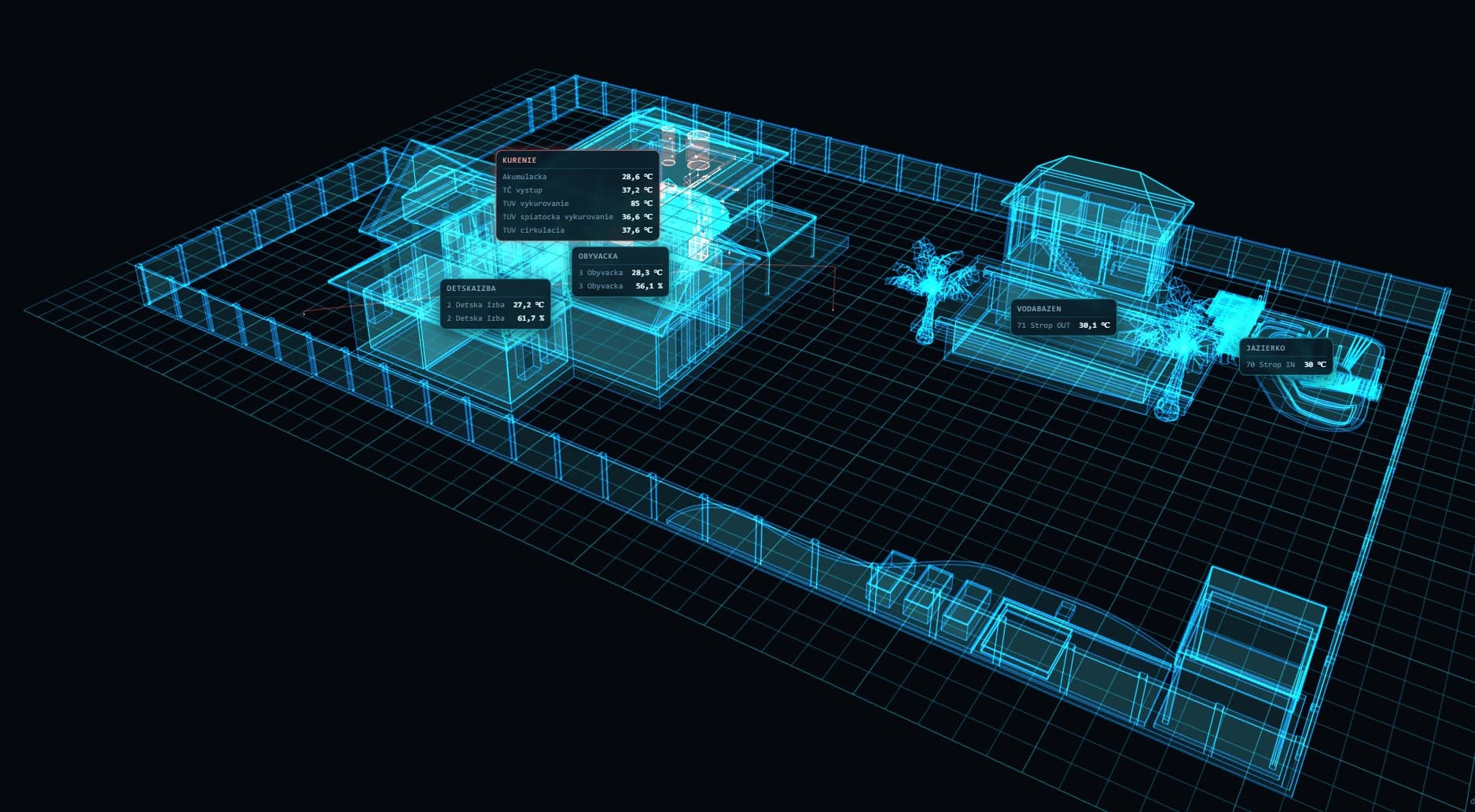
Your home, live in Darwin's head.

A dedicated home plugin: your house as a living 3D model — rooms, pool, garden, the heating circuit — fed by real sensors and smart devices. Ask "how warm is the pool?" and Darwin doesn't guess. He reads the sensor.

Sees every room

Temperature and humidity room by room, the pool and pond water, the whole heating circuit — buffer tank, heat-pump output, hot water. Live, in one place.

Switches the real things

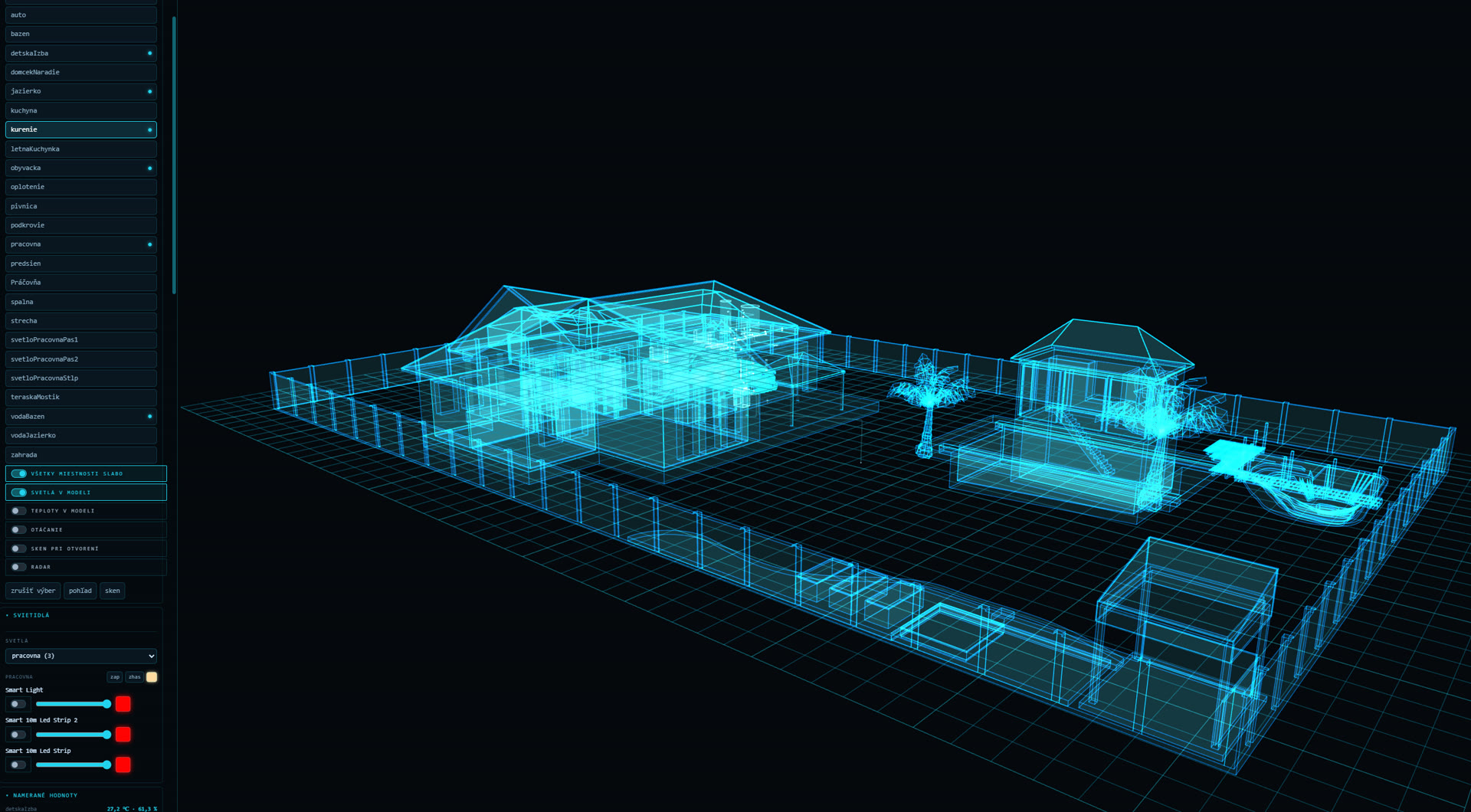
Lights and smart devices connected through Tuya: on and off, brightness, colour — by voice, from the dashboard, or from your phone when you're away.

Lives in the model

Readings show up right where they belong in the 3D model. Toggle lights and temperatures in the model, spin it around, or switch on the radar view.

3D model of a house with live temperature panels — heating circuit, rooms, pool water
live readings, exactly where they belong
Darwin home plugin — room list, smart light controls and the wireframe model
rooms, lights and smart devices in one panel

At work and at home. One Pro plan.

Plenty of us live on two machines — a desktop at work, a laptop at home. That's why a Pro license covers two computers in one name: your main computer and a second device. No extra subscription for your second device.

PriceSecond device
2× Standard€24 / monthyes — but you pay twice
Pro€22 / monthin the price

— and on top of that, Pro adds image & video generation, tools he writes for himself, and helpers without a cap. What you do with the two computers is up to you:

Link them — one Darwin, everywhere

Shared memory between your devices: what Darwin learns at work, he knows at home. The memory lives in your own shared storage (NAS, OneDrive, Google Drive…), so the other computer doesn't need to be on.

Keep them separate — work and private

One Darwin for work, the other purely personal — each with its own memory. Nothing mixes, nothing to configure. You can change your mind and link them any time.

Both computers belong to one name — you and your devices, not a colleague (for that there's the Team setup). Shared memory between devices is a Pro feature. Both devices are covered while your Pro subscription is active.

Working with other people?

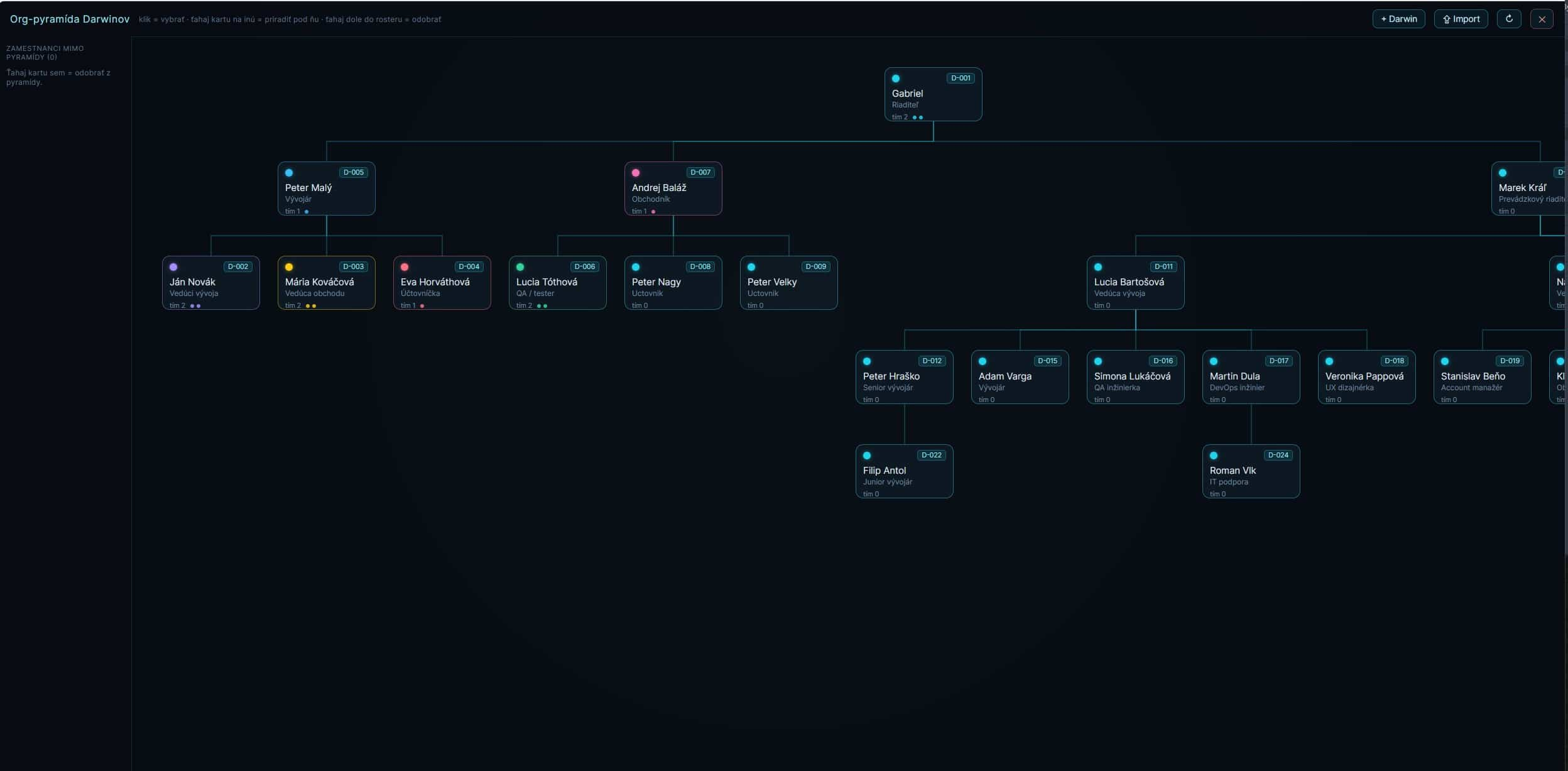
Darwins can be connected. Work is handed from one to another, and you get an overview of what's moving — across employees, collaborators and freelancers alike.

A tailored quote based on your team and connections

Ask about a team setup
Darwin org pyramid — team overview
Before you start

Questions about monthly plans

Does the price include ChatGPT, Claude or other AI services?

No. Your plan covers Darwin and updates to the selected tier. AI models, voice and media use your own accounts, billed directly by the providers. You can also use a local model without API usage charges.

What happens if I cancel?

Under the proposed monthly model, cancellation stops the next renewal. You keep access to Darwin and updates until the end of your paid billing period. Your files, documents and notes are not deleted from your computer.

What if I already bought a one-time license?

Your original license and the terms promised at purchase, including updates, remain in place. This change concerns the new monthly offer. Existing customers won't be moved to a subscription automatically.

Why choose Pro at €22 instead of Standard at €12?

For €10 more per month, you get a second computer in your name, unlimited automations and helpers subject to fair use, custom tool creation, and media generation. AI usage is billed separately.

Do I pay monthly or yearly?

Either. Monthly is €9, €12 or €22 and you can cancel any time. Yearly costs ten times the monthly price — €90, €120 or €220 — so two months are free. VAT is included in both cases.

How do I subscribe?

Pick a plan above and you go straight to Stripe checkout. Your licence key arrives by e-mail as soon as the payment goes through, and you activate Darwin on your computer with it.

Verified buyers

What people who own Darwin say

Real reviews from verified license holders.

Start with one task

Less routine. More work done.

Choose what you want Darwin to help with — from memory and documents to automations and your own team of helpers.

Updates while subscribed · AI usage billed separately

Useful links

Everything to set Darwin up

Some links are referral links — they cost you nothing and support Darwin's development.